
Tree risk assessment software
Tree risk assessment software that runs both matrices for you.
Nine steps on the phone, the same order as the paper form. Targets, site, health, load, defects by tree part. Likelihood of failure times likelihood of impact gives you the first matrix; that result against consequences gives you the rating. The app does the lookup, you make the calls, and the client gets a report from a link.
9
steps: tree, targets, site, health, load, defects, summary, mitigation, finalize
4
targets per tree, each with occupancy, zone, and whether it can be moved
3
tree parts for defects: crown and branches, trunk, roots and root collar
1
link the client opens to read the report
The gap
What the paper form does to a busy day
The two-page form is fine. The problem is what happens after: the sheet rides around in the truck, the matrices get worked out from memory at a kitchen table, the photos live on a phone that is not the one the form is on, and the report gets typed up a week later from all three. Every handoff is a chance for the rating to drift from what you saw.
The matrix gets done from memory
Two lookups per defect, four rows by four columns each. Most assessors have them memorized, and most have also written one down wrong once when they were tired. The app looks it up every time.
Defects lose their target
A codominant union over the driveway and the same union over the back fence are two different ratings. On paper the link between defect and target is a line drawn between boxes. In the app each defect is tied to the target it can hit.
The report is a second job
Retyping the form into a document, attaching photos, writing the narrative. If the assessment already lives in a database, the report is a button.
Step 2
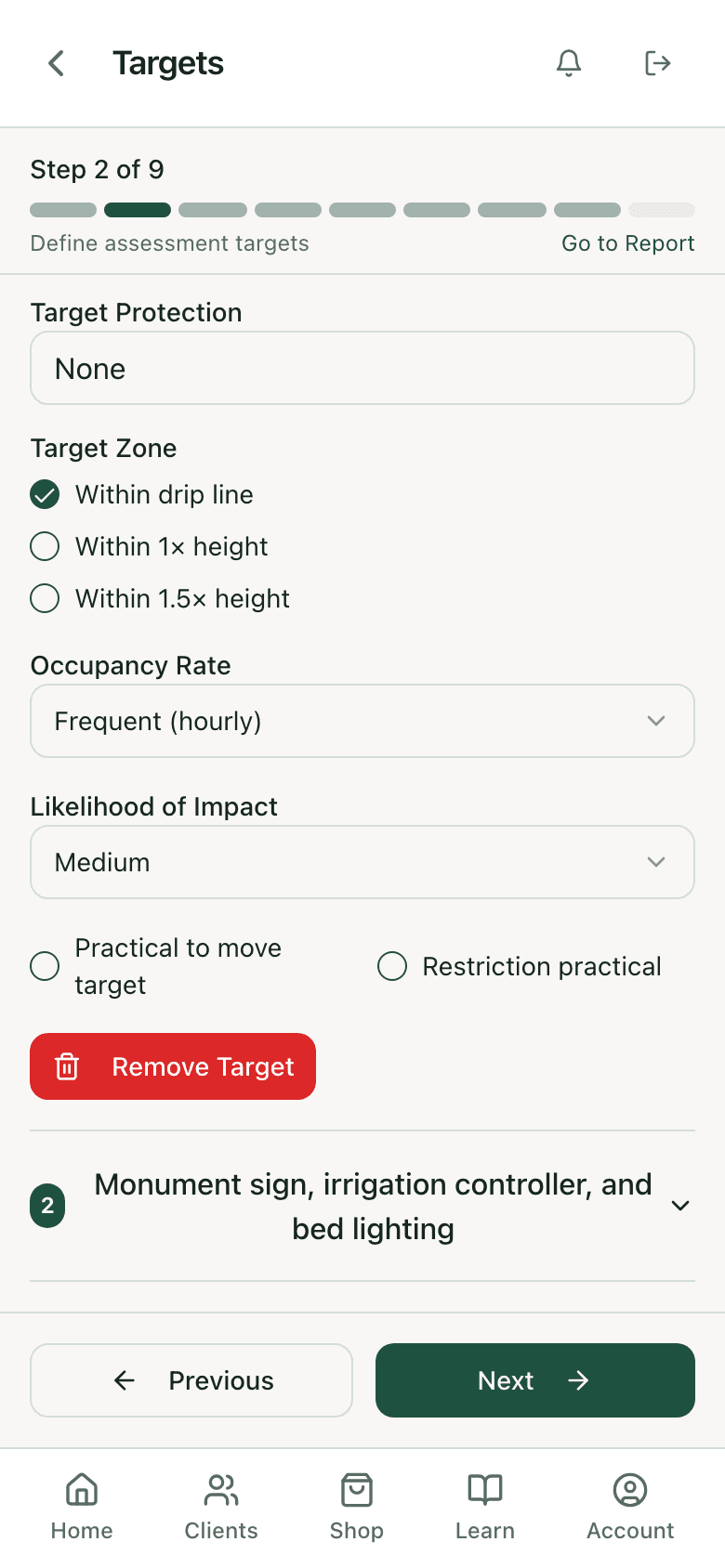
Targets: who and what is under the tree.
Up to four per tree. Each one gets a description, an occupancy rate from rare to constant, a target zone (within the drip line, within one times the height, within one and a half), a likelihood of impact, and two yes-or-no questions the mitigation step will need: can the target be moved, and is restricting access practical.
Step 3
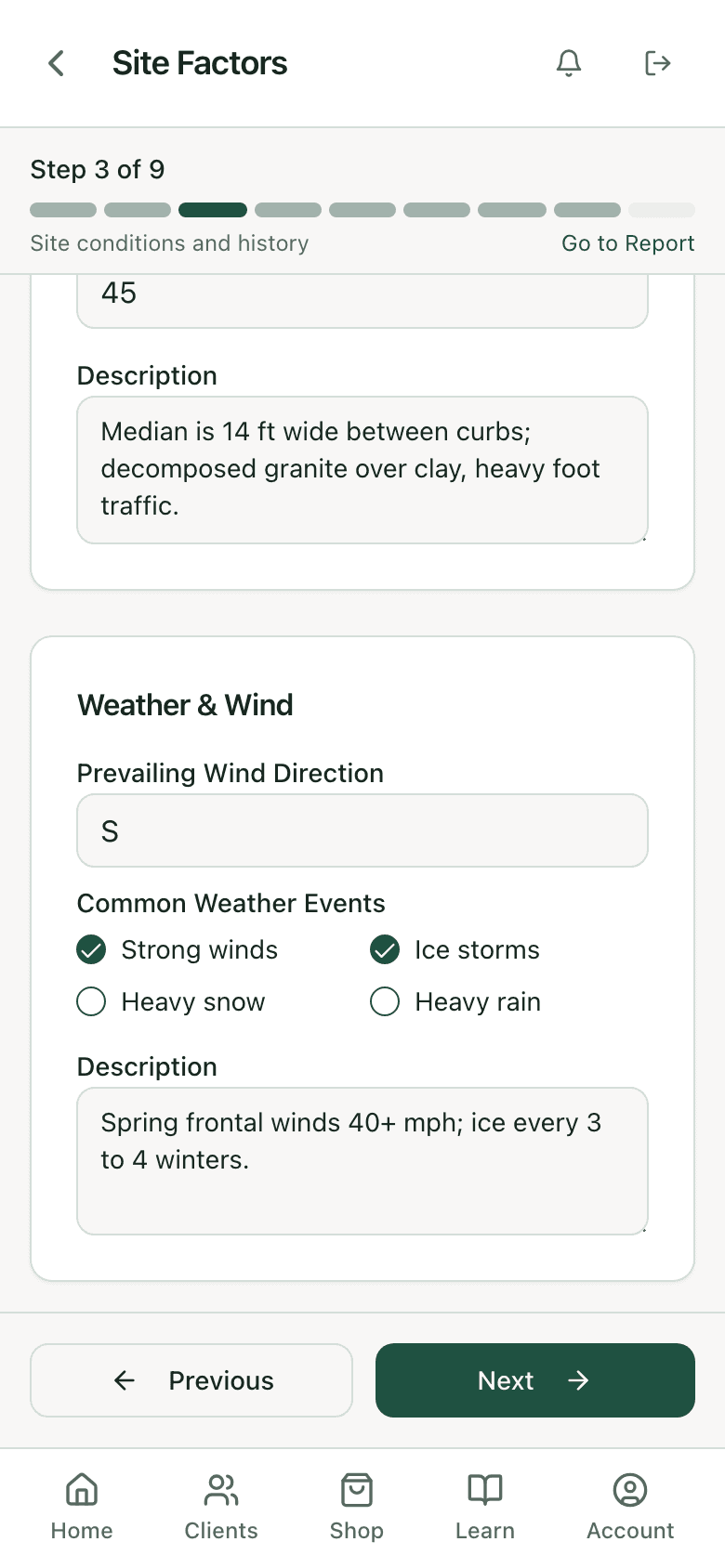
Site factors: what happened here before you arrived.
Failure history, topography, site changes (grade change, root cuts, clearing, changed hydrology), soil conditions, pavement over roots as a percentage, prevailing wind, and the weather this site sees. A live oak in a rebuilt median with a trench through the east roots is a different tree than the same oak in a pasture, and this is where that gets written down.
- Failure history as free text, so "one 6-inch limb in the May 2024 wind event" survives to the report
- Soil and site-change checklists match the form line for line
- Pavement percentage and slope as numbers, not adjectives
Steps 4 and 5
Health profile and load factors.
Vigor, foliage status with normal, chlorotic, and necrotic percentages, biotic and abiotic conditions, and the species failure profile. Then the load: wind exposure, funneling between buildings, relative crown size, density, interior branching, vines or mistletoe, and recent load changes such as the neighbor that came down last spring. Both feed the likelihood of failure call you make on each defect.
Diagnose the health problem separately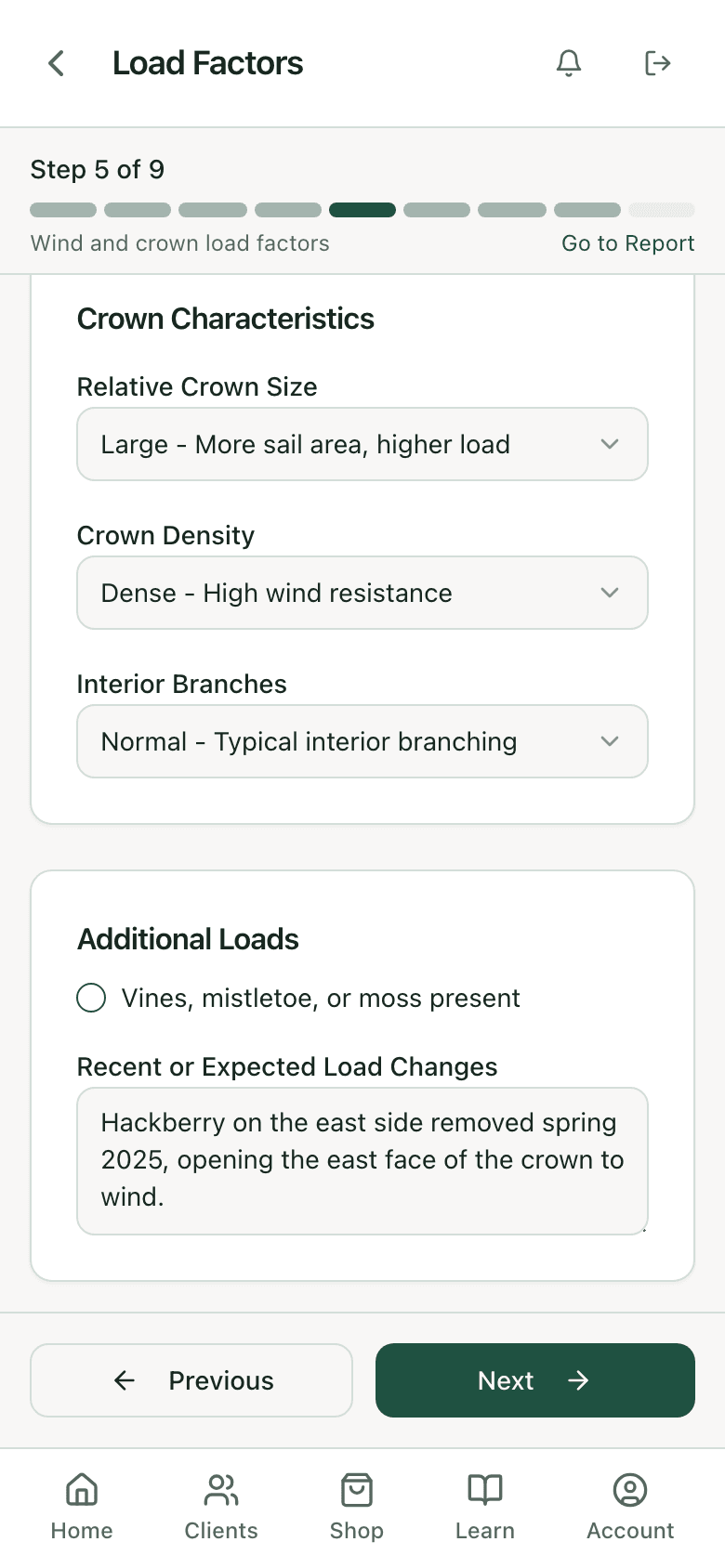
Step 6
Defects by tree part, each tied to a target.
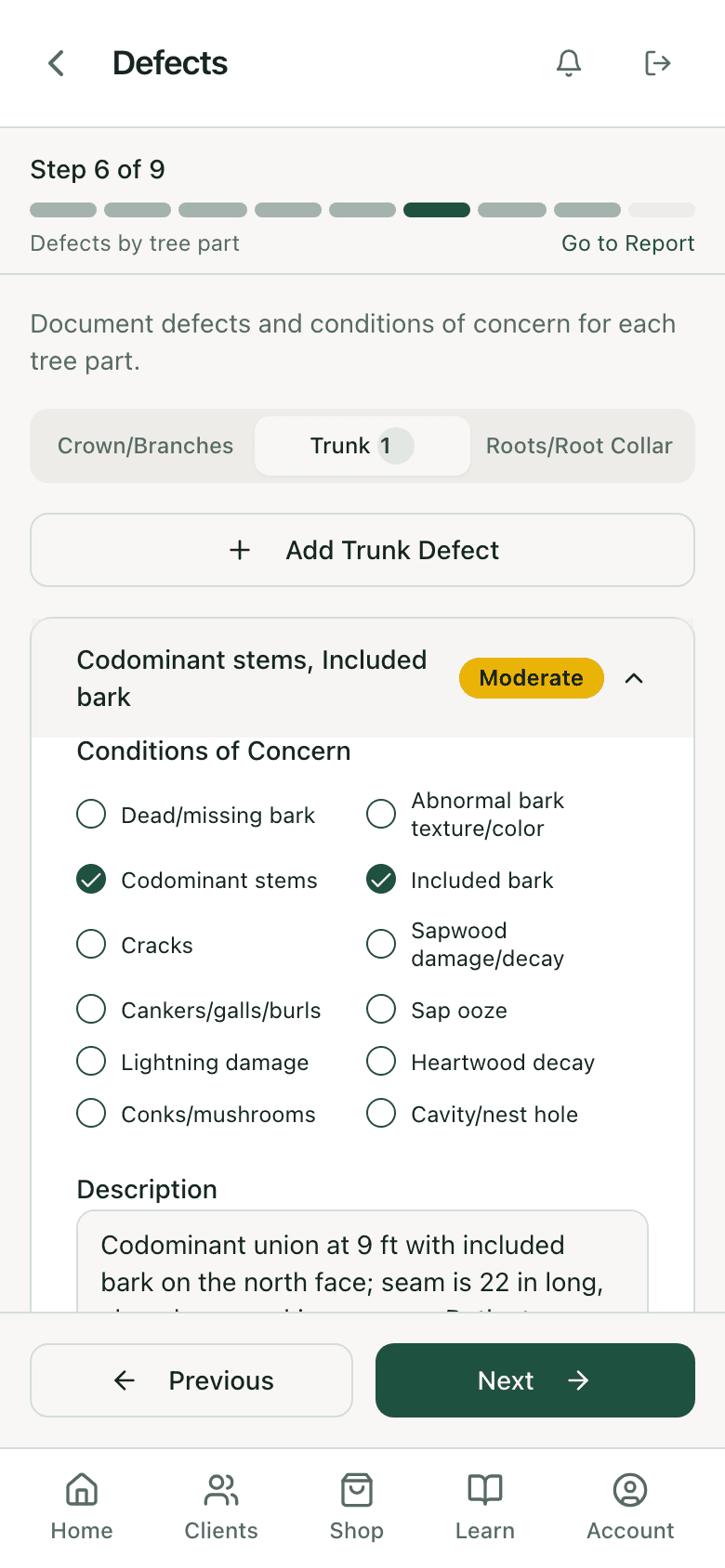
Crown and branches, trunk, roots and root collar, with the condition-of-concern checklist for each part. Part size, fall distance, load on the defect, response growth and what it looks like, photos, and a written justification. Then the three calls that drive the rating: likelihood of failure, likelihood of impact on the chosen target, and consequences. The matrix result shows up under them as you choose.
Step 7
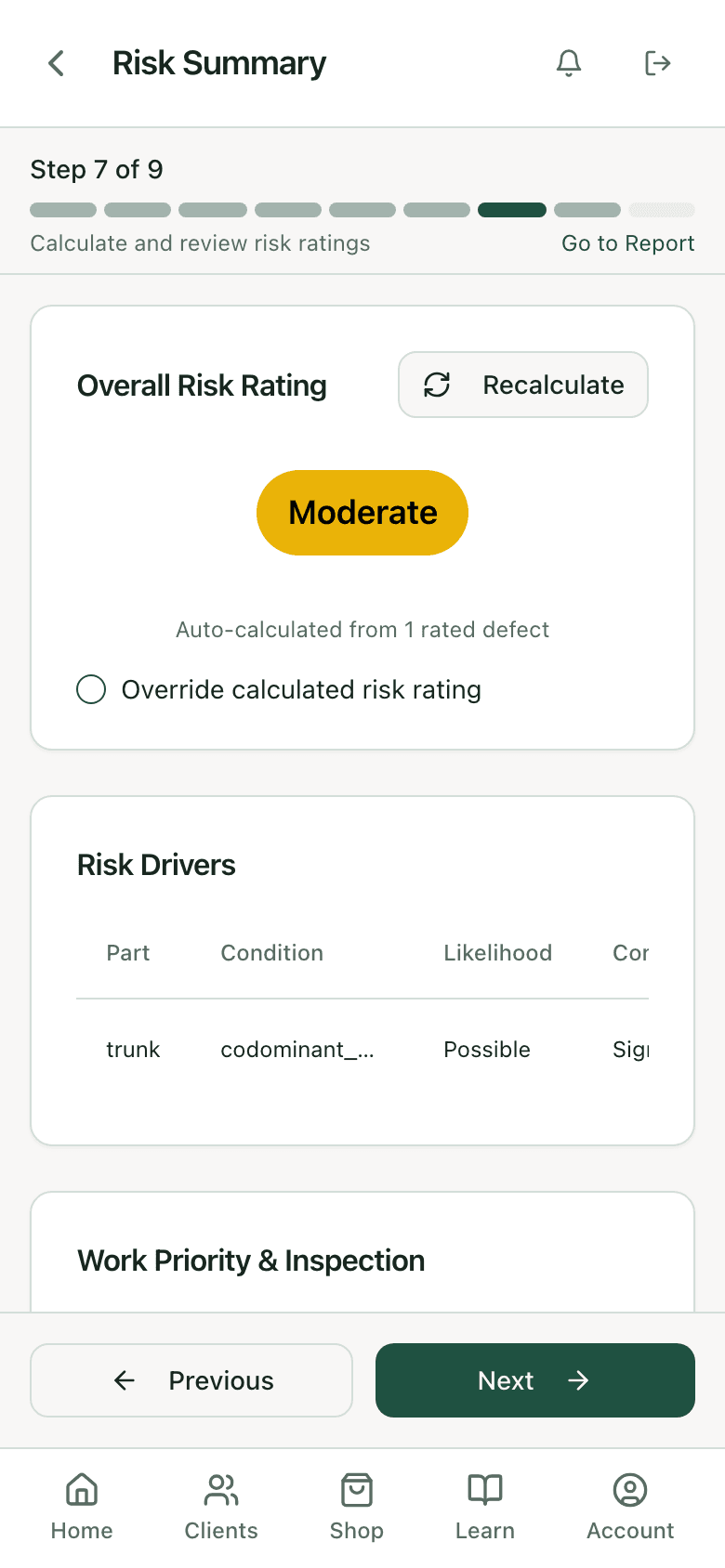
Risk summary: the rating and the drivers.
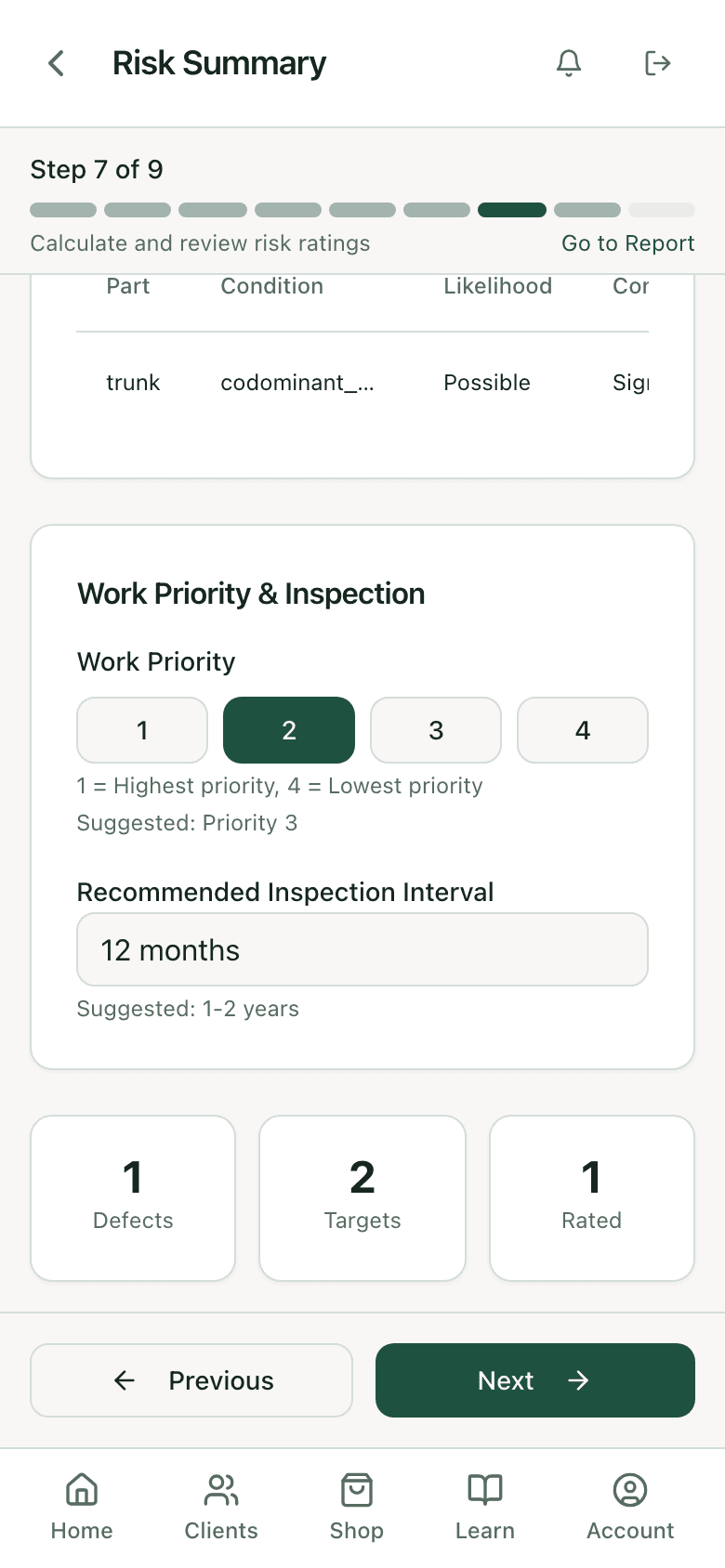
Overall risk is the highest rated defect, auto-calculated, with an override you have to justify in writing. Under it, the drivers table lists every rated defect by part, condition, likelihood, and consequence. Work priority 1 to 4 and a recommended inspection interval come with suggested values you can change.
Step 8
Mitigation with residual risk.
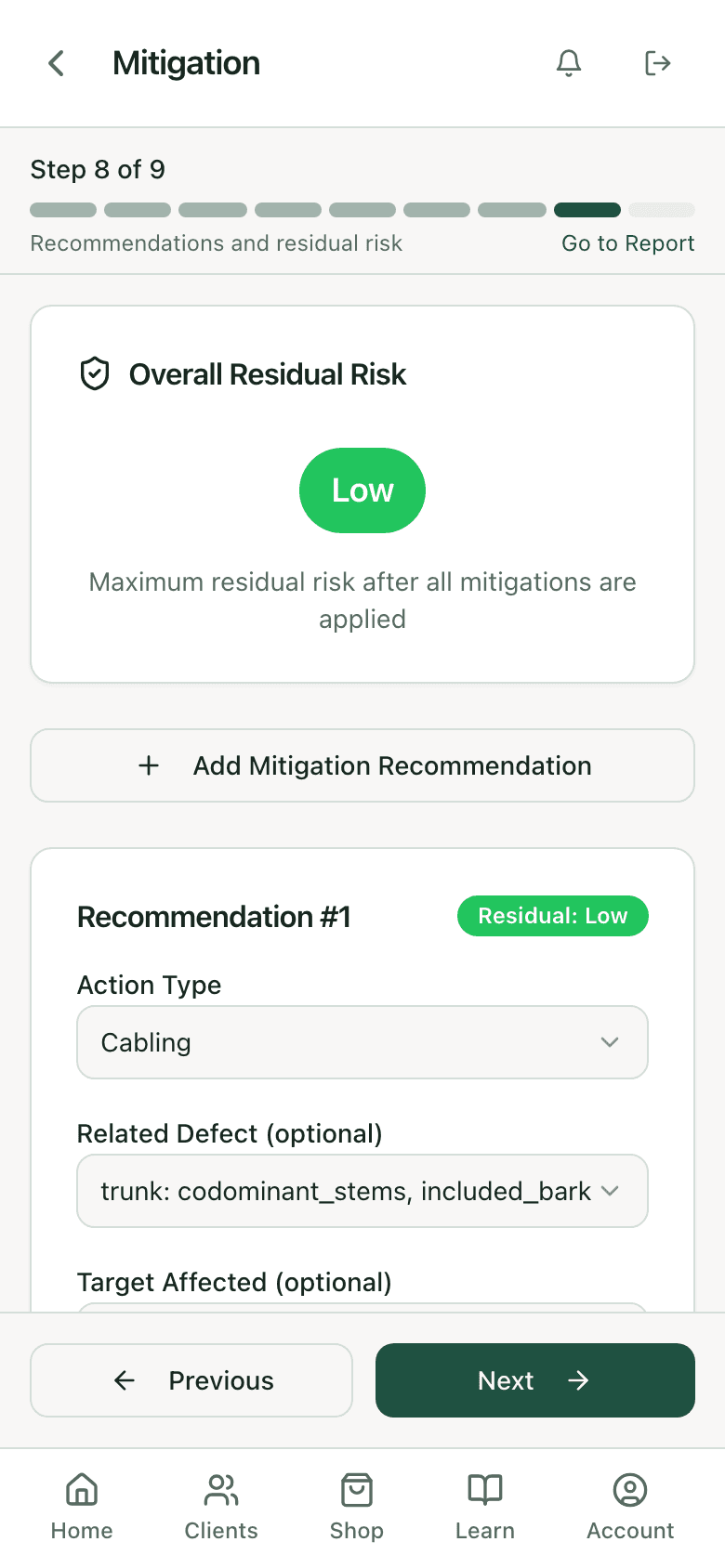
Each recommendation has an action type (removal, pruning with a pruning type, cabling, bracing, a PHC treatment, move the target, restrict access, barriers, monitor and reinspect), the defect and target it addresses, notes, and the residual risk you expect after the work. The overall residual risk is the highest one left. If the fix is a treatment rather than a saw, it becomes a prescription the client can accept from the same account.
Step 9
Finalize, then the report is one tap.
Tools used, inspection limitations, general notes, preliminary or final. Mark it final and the summary locks: overall risk, residual risk, priority, interval. Generate the report and pick what it contains: tree identification, risk rating, targets, defects, mitigations, photos, the defect narratives, the risk and prognosis narratives. Email it or download it. The client opens a link, not an attachment they have to find later.
How the report side works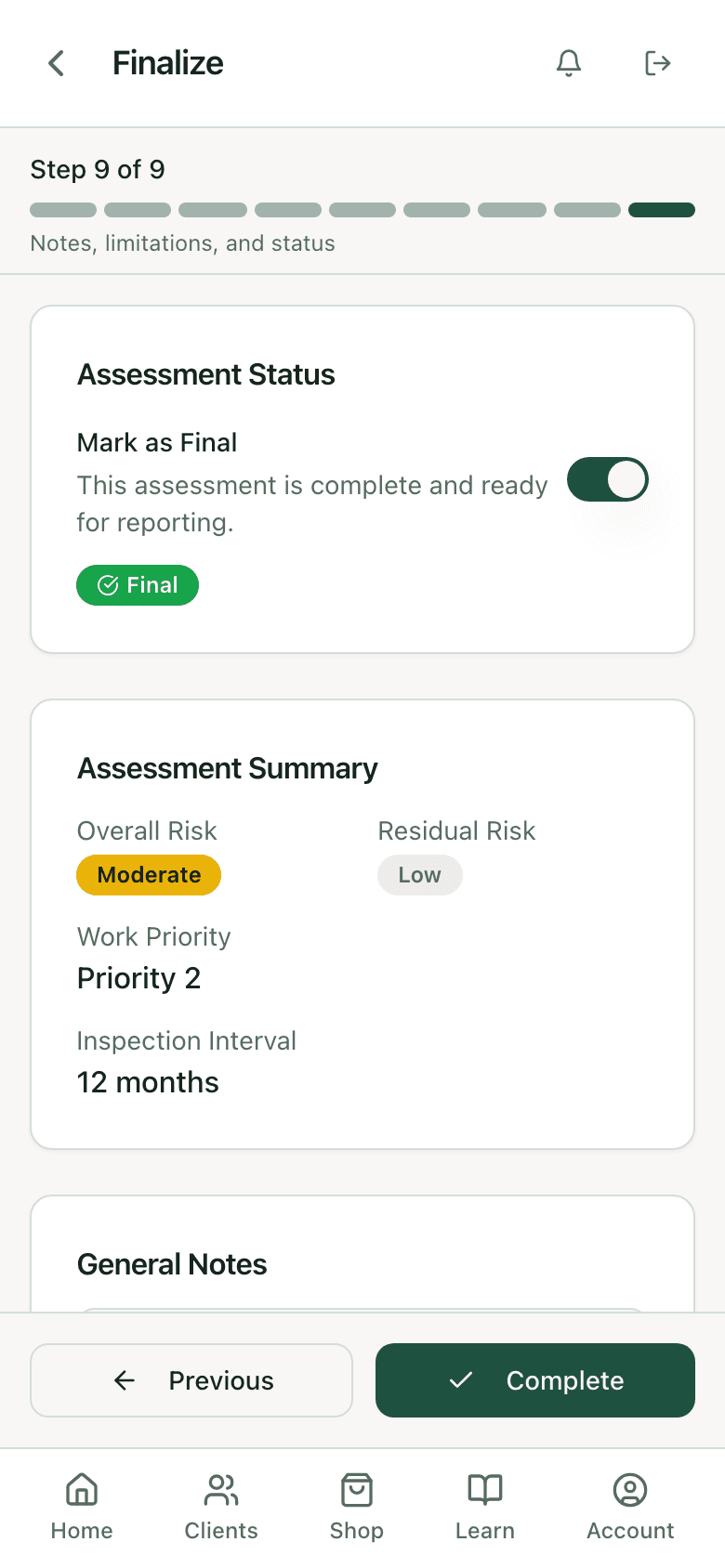
Straight from the app
The rest of the assessment.
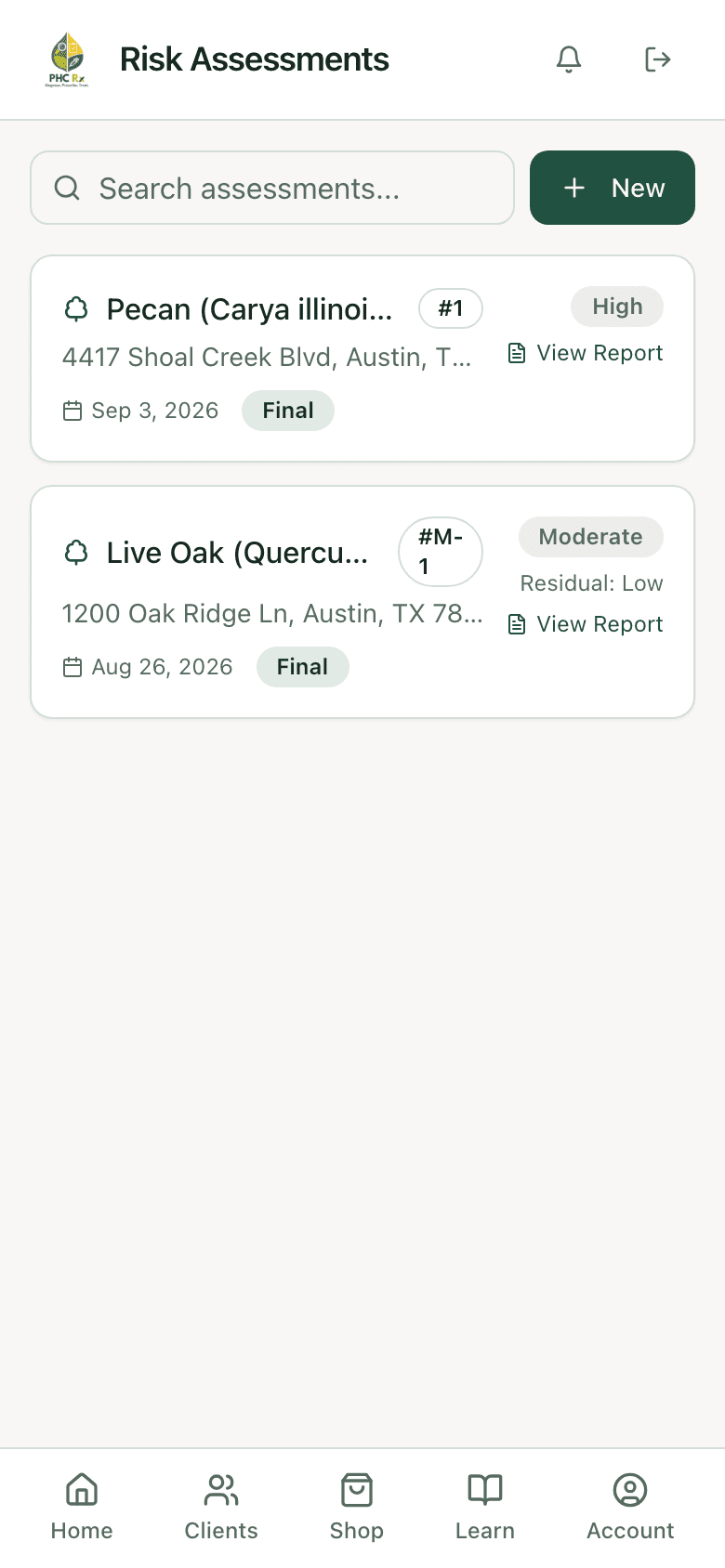
Every tree, its rating, its report
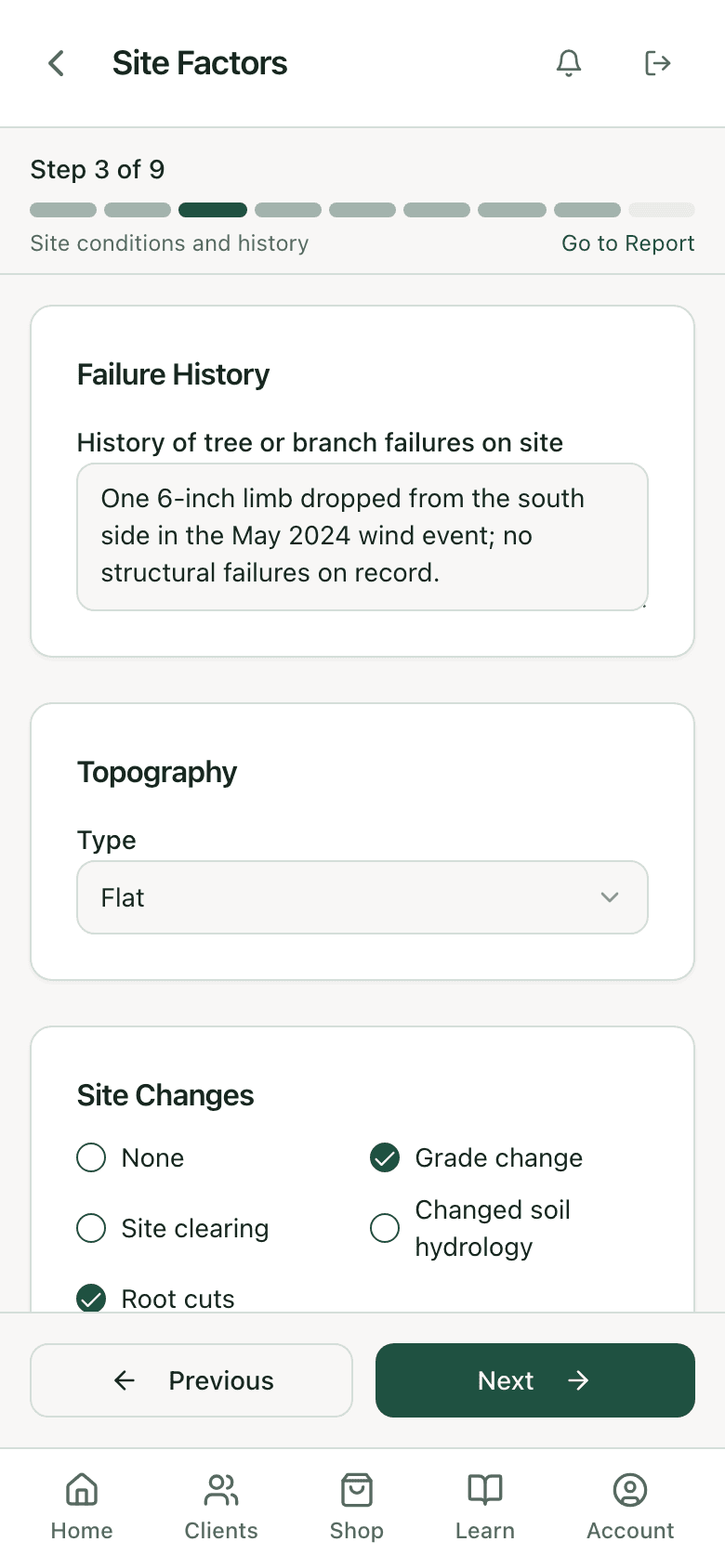
Failure history and site changes
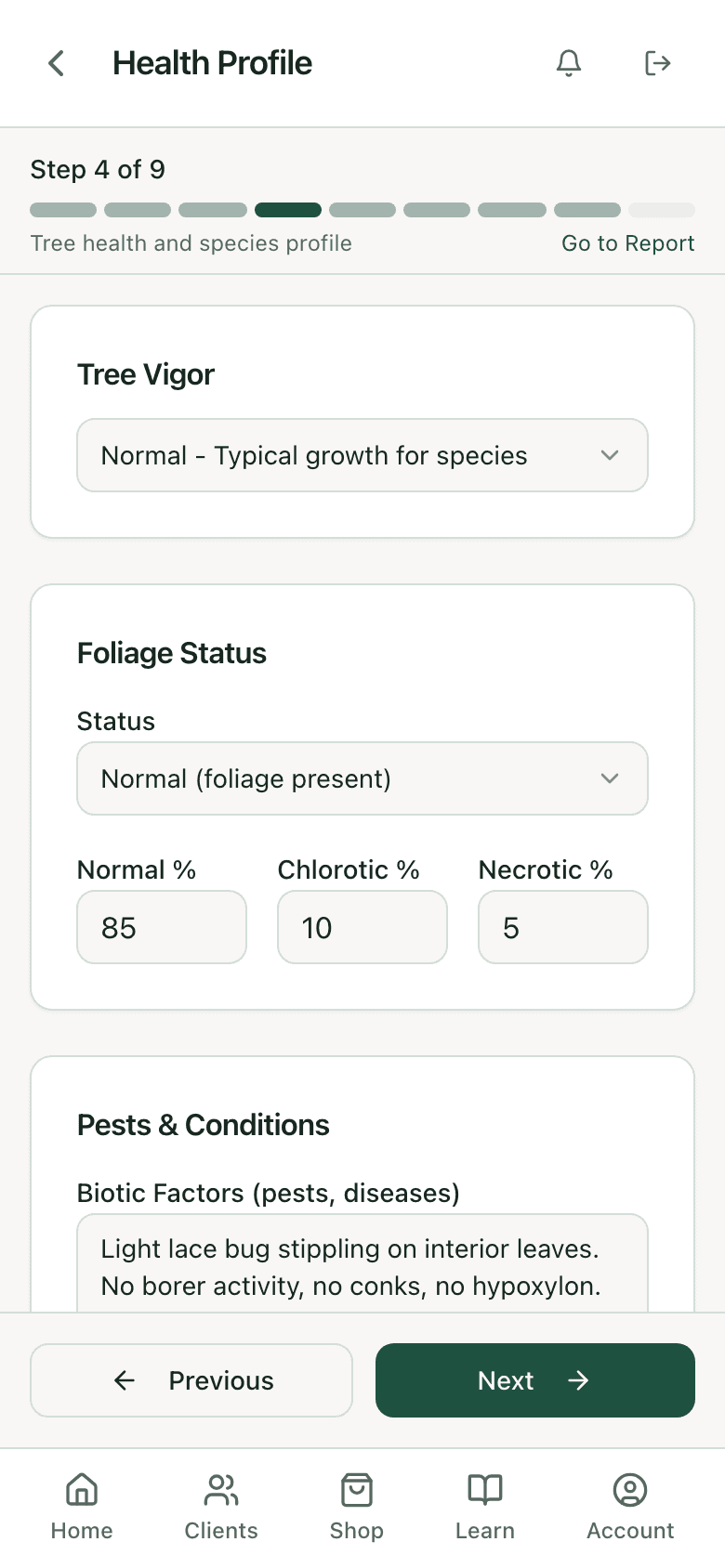
Health and species failure profile
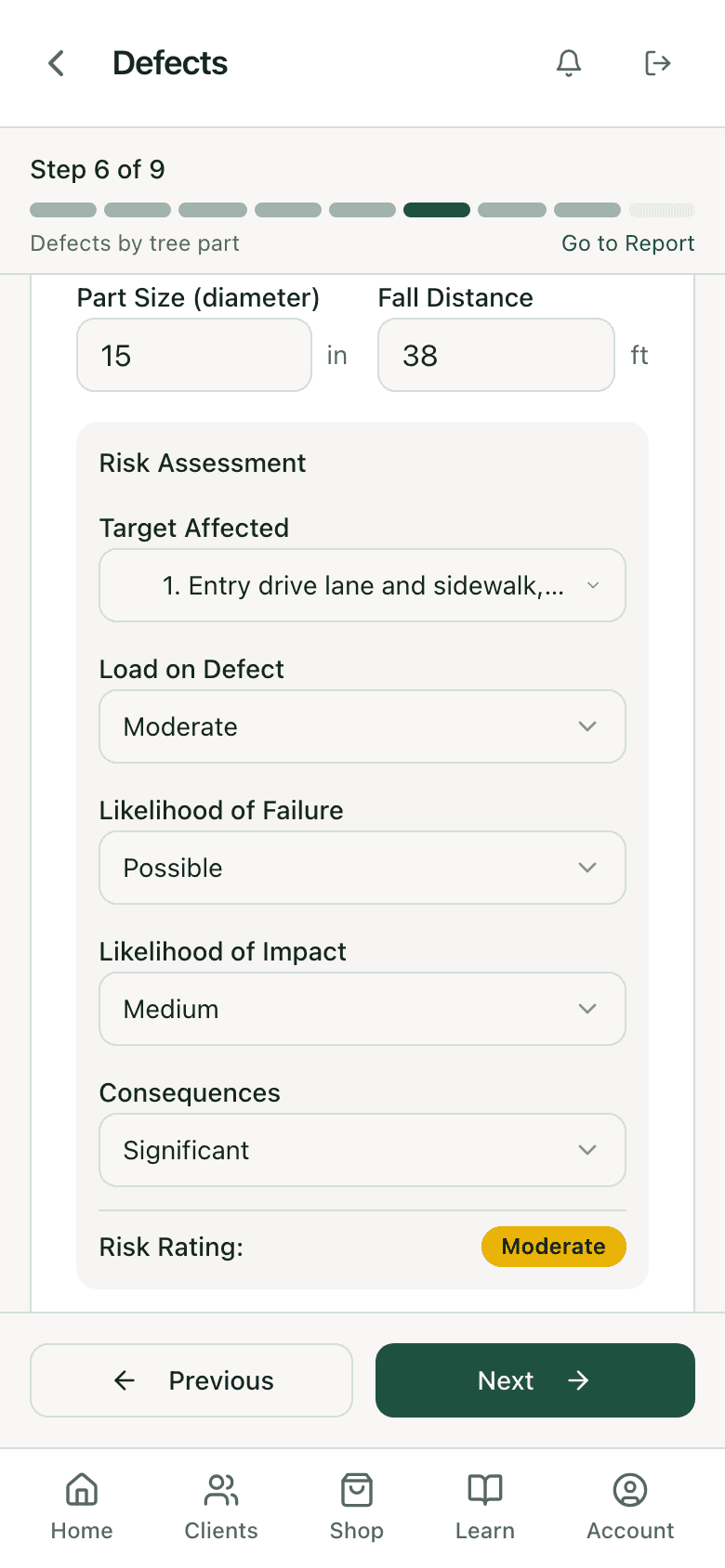
The three calls and the result
How the two matrices are applied
The first matrix takes your likelihood of failure (improbable, possible, probable, imminent) and your likelihood of the failed part hitting the target (very low, low, medium, high) and returns a combined likelihood: unlikely, somewhat likely, likely, or very likely. The second takes that combined likelihood against consequences (negligible, minor, significant, severe) and returns the rating: low, moderate, high, or extreme.
The app does the lookup and nothing else. It does not decide that a crack is probable or that a driveway is significant. Those are your calls, made with the evidence you recorded in steps 3 through 6, and the justification field under each defect is where you say why. The rating is defensible because the reasoning is on the record, not because the software said so.
What it stores, and where
Every step writes to its own record: targets, site factors, health profile, load factors, defects, and mitigations each live in their own table under the assessment, so a defect knows which target it threatens and a mitigation knows which defect it addresses. Photos attach to the defect they show. The assessment carries the tree, the client, the address, DBH, height, crown spread, the assessor names, sheet numbers, and the time frame. Nothing is a free-text blob you have to parse later.
That structure is why the report can be generated instead of written, and why an assessment done by one assessor can be reviewed by another without a phone call. It is also what a plan reviewer or an attorney asks for when the question is what you knew and when.
Who it is for
- Consulting arborists doing basic-level assessments for HOAs, municipalities, and property managers who want a report they can file.
- Tree services that assess before they prune or remove, so the recommendation on the estimate has a rating behind it. Starting the PHC side usually follows.
- Municipal foresters keeping an inspection interval on street and park trees, with the next inspection date on the record.
- Anyone who has retyped a paper form into a report on a Sunday.
What it does not do
It does not do advanced assessment. If the tree needs a resistance drill or a sonic tomograph, the app records that advanced assessment is needed and why, and stops there. It does not estimate likelihood of failure from a photo, and it does not carry a preset rating for any species or defect. Every rating is yours, on the record, with the reasoning next to it. Pesticide records and license tracking are a different job and live in the arborist compliance software; the client-facing PDF itself is covered under arborist report software.
FAQ
Questions arborists ask
Is this a TRAQ app?
It follows the basic-level assessment method most arborists were trained on: targets, site, health, load, defects by part, two matrices, mitigation with residual risk. The app is not affiliated with any certifying body. Your qualification is yours; the app records the assessment.
Does it calculate the risk rating?
It applies the two matrices to the calls you make. You choose likelihood of failure, likelihood of impact, and consequences for each defect; the app returns the combined likelihood and the rating and rolls the highest one up to the tree. You can override the overall rating with a written reason.
Can I attach photos to a defect?
Yes. Each defect has its own photo capture, and the tree has a primary photo. Photos go into the report under the defect they document.
What does the client get?
A report at a link, branded to your company, with the sections you chose: identification, rating, targets, defects, mitigations, photos, and narratives. You can also download it. More on reports.
Can I still use the paper form?
Yes, and the printable form on this site matches the app step for step, so a crew can do one on paper and enter it later without translating.
Does it work with no signal?
Assessments you have opened stay available and new work queues on the phone until you are back in range. More on the mobile apps.
What does it cost?
It is part of every PHC Rx plan, from $99 a month for one seat, with diagnosis, prescriptions, the label check, and the rate calculator in the same subscription. Plans and trial.
Related